


 ZX Spectrum Diag Cart - DIY kit

 Ampliar la imágen
- Categoría:
- Computadoras Retras >> Sinclair >> Sinclair ZX Spectrum >> Hardware >> General / Add-Ons
- Tipo de anuncio:
- Precio Fijo Cantidad Multiple
- Item Condition:
- New
- Ubicación del vendedor:
- Eindhoven, Netherlands
- Tiempo restante:
- Este anuncio está finalizado (10/01/2026)
Notify When Back in Stock - Cantidad disponible:
- 99
- Precio fijo:
- £41.13
- Gastos de envío:
- From only £4.84
- Formas de pago:
- Pay Pal
- Cantidad vendida:
- 0 (Ver historial)
Item Number : 64863
Vendedor
ByteDelight (158)

Feedback received in last 120 days :
8 veces
- Positivo: 8 (100%)
- Neutral: 0 (0%)
- Negativo: 0 (0%)
Dear ByteDelight customers.
We are sad to share that ByteDelight's founder Ben has passed away. His family is in the process of arranging his affairs. This means the webshop has been closed for ordering. Any outstanding orders will be taken care of in due time, we hope for your understanding and patience in this difficult situation.
If you want to share your condolences, funny stories, or anything else, please reach out to condolences@bytedelight.com.
For questions about ongoing orders, please use orders@bytedelight.com
We know Ben was extremely grateful for the community of ZX Spectrum enthusiasts, tinkerers and likeminded geeks.
Thank you for your patronage.
~Ben's family
Contactar al vendedor
Añadir Vendedor a mis Favoritos
See Other Items
Descripción
ZX Diag Cart - DIY kit
The ZX Diag Cart will show all kinds of details of your ZX Spectrum, with visual indictators which is both looking cool and useful at the same time!
It will make diagnosing defects a lot easier:
- Quickly check if voltages are present
- If there is a dataline 'stuck'
- If the M1 line is working...
If you are thinking of repairing your own ZX Spectrum (any model, including many clones), this is the tool you must have!
Photos
Check out the photos in the picture gallery!
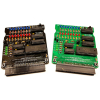
Let me know which board colour (black or green) you like when checking out!
DIY kit
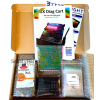
The kit contains:
- The circuit board with SMD parts already assembled
- All parts in separately labeled bags with their part numbers for easy matching
- IC's and sockets on anti-static foam
- The manual and DIY build guide
Hardware features
Autodetection of ZX Spectrum model
The ZX Diag Cart automatically detects to which ZX Spectrum model it is connected, so it can control the ROM signals on ZX Spectrum 16/48K, 128K+, +2, +2A or +3, and many clones.
LEDs
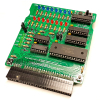
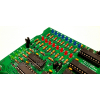
The ZX Diag Cart has 20 LEDs showing these groups of information:
- Control signals status, indicated by the blue LEDs
- Data lines status, indicated by the red LEDs
- Power lines status, indicated by the green LEDs
The speed of change of the LEDs is limited by a clever timing circuit, so it’s easier to see what signals are acting and which are stable
Slider switch
Slide it to the right to have the blue LEDs show the status of the data lines present on the edge connector.
Slide it to the left to have the blue LEDs show stages of the diagnostic software.
ROM1/OE jumper
This jumper is for compatibility with the Brazilian clones that use this line for audio.
When using a Brazilian ZX Spectrum clone (TK90X and TK95), disable the jumper (store it on one of the pins).
Enable this jumper for original ZX Spectrum models and other clones.
J1 jumper option – FLASH/SPECTRUM
When a jumper is present on pins 1-2, it will enable the integrated diagnostics software.
When a jumper is present on pins 2-3, it will have the ZX Spectrum boot as normal.
J2 jumper option – M1 Ignore / Normal
When a jumper is present on pins 1-2, it will ignore the M1 line in case it’s not working properly.
When a jumper is present on pins 2-3, it will use the M1 line.
Of course, when the M1 line of the Z80 CPU is failing, the Z80 CPU must be replaced!
Integrated Diagnostic Tools
The ZX Diag Cart comes with the ZX Spectrum Diagnostics software, developed by Dylan Smith and Brendan Alford.
If lower ram fails, the software also shows border effects to indicate bad chips.
The manual containst much more information about how to debug such a situation.
The basic diagnostic tool tests:
- ZX Spectrum Internal ROM
- ZX Spectrum lower RAM
- ZX Spectrum upper RAM
- ZX Spectrum RAM paging*
- Interrupts
*With 128K models
There are more features that you can launch with a key-press directly after powering up – this is shown on screen.
Needed to assemble the kit
If you ordered the kit, you additionally need these tools to assemble it:
- Solder wire
- Soldering iron
- Side cutter to cut the legs of parts
- Coffee or tea - and a beer for when you’re finished!
SMD parts
The SMD parts have already been soldered on with the DIY kit.
Galería de imágenes


Questions and Answers
No hay preguntas
You need to be logged in to ask a question
Envío y Pago
- Item Location:
- Eindhoven, Netherlands
- Condiciones de envío:
- Gastos de envío a cargo del comprador
- Gastos de envío:
-
- Para Netherlands :
- First Class Post : £4.84 Por artículo inicial, £2.42 Por artículos adicionales
- Para EU :
- Intl Signed For : £16.94 Por artículo inicial, £8.47 Por artículos adicionales
- Para Europe (Non EU) :
- Intl Signed For : £19.36 Por artículo inicial, £9.68 Por artículos adicionales
- Para Americas (Non USA) :
- Intl Signed For : £19.36 Por artículo inicial, £9.68 Por artículos adicionales
- Para Resto del Mundo :
- Intl Signed For : £19.36 Por artículo inicial, £9.68 Por artículos adicionales
- Para USA :
- Intl Signed For : £19.36 Por artículo inicial, £9.68 Por artículos adicionales
- Condiciones de envío:
- No especificado
- Formas de pago:
- Pay Pal
Vendedor: Ben Versteeg Iserelaan 6, Eindhoven, 5627NL, Netherlands
All prices and shipping include VAT at 21% where applicable
VAT Number: NL860142681B01
The seller accepts all responsibility for this listing
Visitas: 875
